Hooks
Hooks are the integration points between your plugin and AMC. Each QML file in your plugin is classified by its filename -- AMC scans for hook keywords (case-insensitive) to determine where the file should be loaded.
Hook reference
| Hook | Filename keyword | Purpose | Singleton? |
|---|---|---|---|
| Data | data |
Shared state and logic | Yes |
| Settings | settings |
Settings panel | No |
| UpperFlyView | upperflyview |
Flight display overlay | No |
| MenuItemButton | menuitembutton |
Side menu button | No |
| MenuItemView | menuitemview |
Full-screen view | No |
| FlyViewTSButton | flyviewtsbutton |
FlyView tool strip button | No |
| MapItemView | mapitemview |
Custom items on the Plan and Fly view maps | No |
Naming convention
The hook keyword must appear somewhere in the filename. For example, NetFetchUpperFlyView.qml matches the upperflyview hook. The match is case-insensitive.
Availability
The MapItemView hook requires AMC 2.1.0 or later. On earlier versions the file is ignored. All other hooks are available in every AMC 2.x release.
Data
The Data hook registers a QML file as a singleton. It serves as the shared state and logic layer for all other plugin components.
Requirements:
- Filename must contain
data(e.g.,MyPluginData.qml). - Must start with
pragma Singleton. - The QML type name (used by other files) must match the filename without the
.qmlextension.
Example:
pragma Singleton

import QtQuick
import QtCore
import QGroundControl
import QGroundControl.Plugin

Item {
    id: root

    property bool enabled: false
    property string currentData: "No data"

    Settings {
        id: settings
        category: "MyPlugin"
        property alias enabled: root.enabled
    }

    Component.onCompleted: {
        PluginManager.log("MyPlugin: Data initialized")
    }
}
Other plugin files access the singleton by importing Plugin and using the type name directly:
See Data Singleton for a deep dive.
Settings
The Settings hook provides a panel that appears on the AMC Settings page under Plugins.
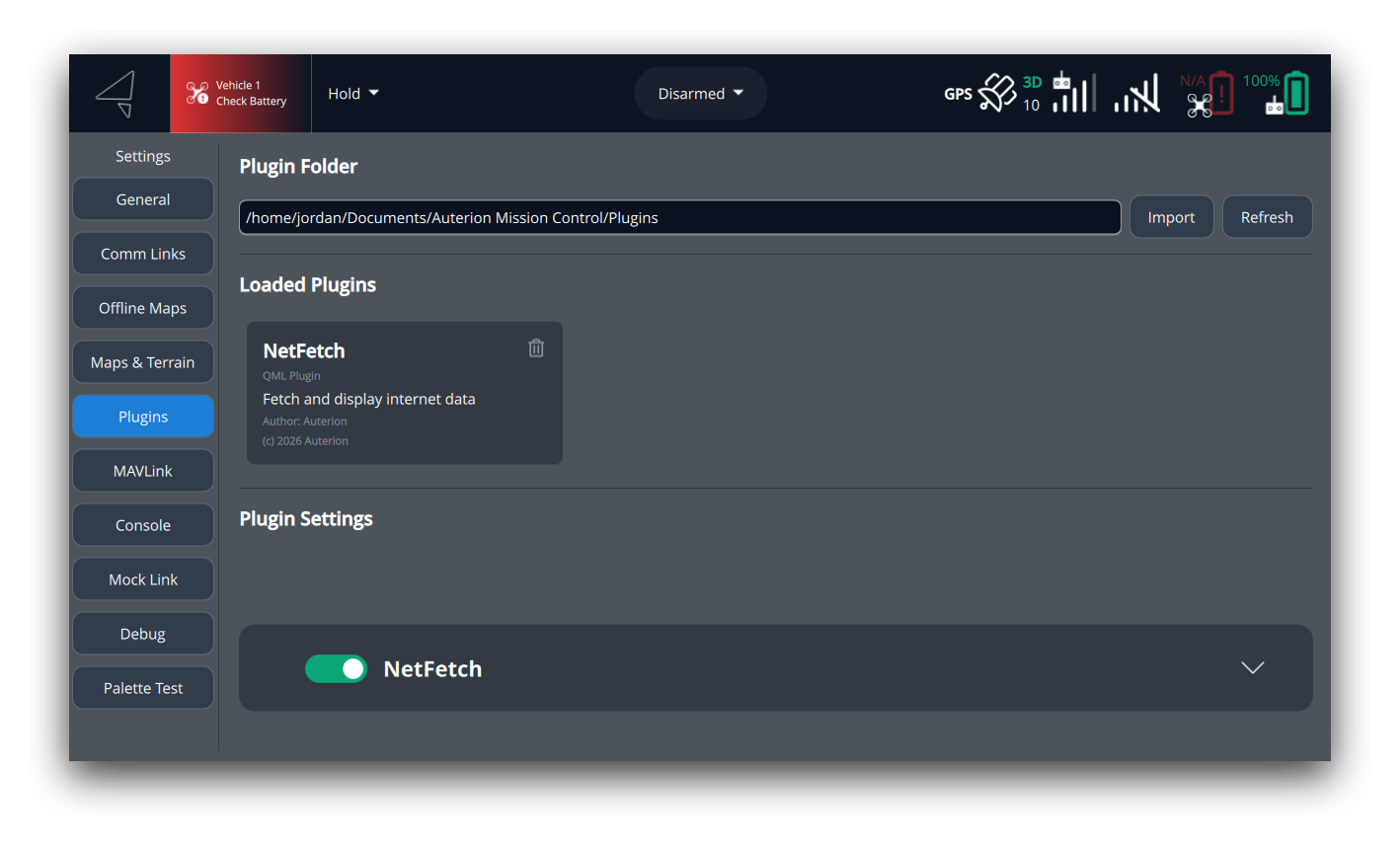
Requirements:
- Filename must contain
settings(e.g.,MyPluginSettings.qml).
Standard header pattern:
Every settings panel must use the same header bar: a rounded rectangle containing a CustomSwitch, a bold title label, and (optionally) an expand/collapse chevron. This ensures a consistent look across all plugins on the Settings page. The content below the header (the collapsible area) is fully custom per plugin.
See the full implementations in NetFetchSettings.qml and MFDSettings.qml for the complete pattern including the collapsible animation.
UpperFlyView
The UpperFlyView hook places widgets in the upper area of the flight display.
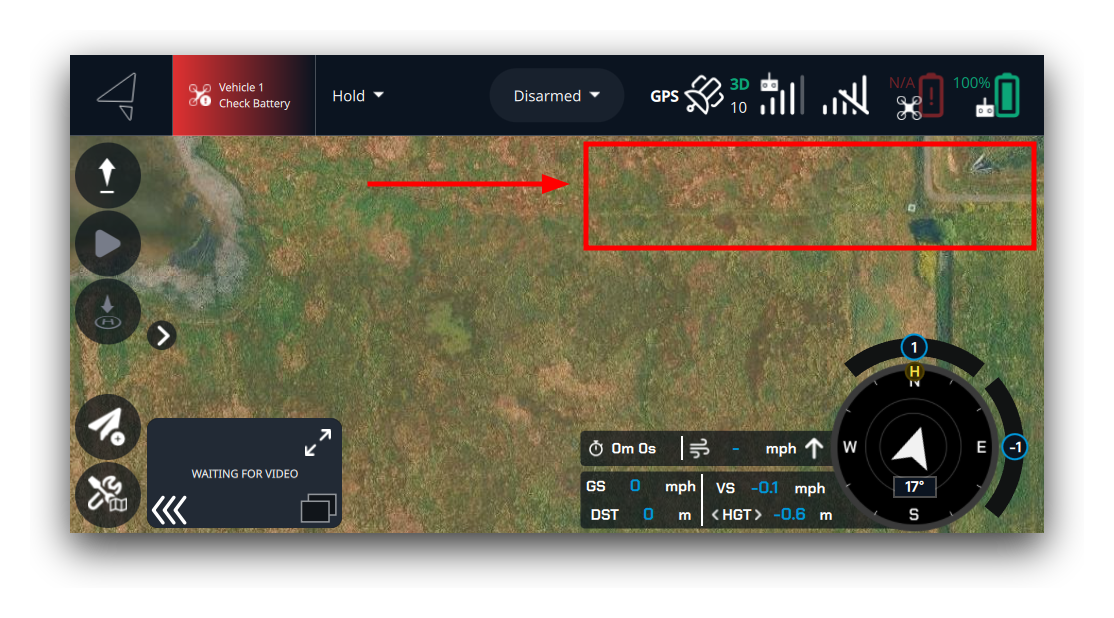
Requirements:
- Filename must contain
upperflyview(e.g.,MyPluginUpperFlyView.qml).
Example:
import QtQuick
import QtQuick.Layouts

import QGroundControl.Controls
import QGroundControl.Palette
import QGroundControl.ScreenTools

import QGroundControl.Plugin

Rectangle {
    width: row.width + ScreenTools.defaultFontPixelWidth * 2
    height: row.height + ScreenTools.defaultFontPixelWidth

    color: qgcPal.windowShade
    border.color: qgcPal.colorGreen
    border.width: 1
    radius: ScreenTools.defaultFontPixelWidth / 2

    visible: MyPluginData.enabled

    RowLayout {
        id: row
        anchors.centerIn: parent
        spacing: ScreenTools.defaultFontPixelWidth

        QGCLabel {
            text: MyPluginData.currentData
            font.pointSize: ScreenTools.mediumFontPointSize
            color: qgcPal.text
        }
    }
}
MenuItemButton
The MenuItemButton hook adds a button in the side menu drawer. It is typically paired with a MenuItemView to provide a full-screen view.
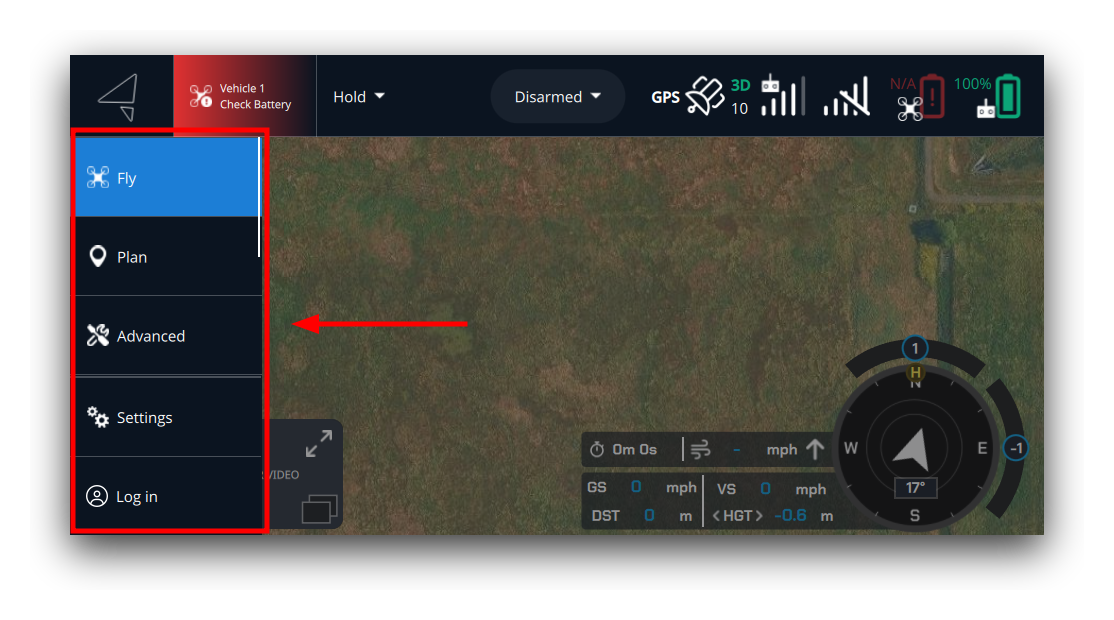
AMC pairs buttons with views automatically using a naming convention: strip the hook keyword from each filename (case-insensitive) and match on what remains. For example, MyPluginMenuItemButton.qml pairs with MyPluginMenuItemView.qml because both resolve to MyPlugin.
A button without a matching view is standalone — override onClicked for custom behaviour.
Requirements:
- Filename must contain
menuitembutton(e.g.,MyPluginMenuItemButton.qml). - Use
PluginMenuItemButton(fromQGroundControl.Widgets) as the root element. It handles the divider, highlight state, and navigation automatically.
Example (paired with a view):
import QGroundControl.Widgets

PluginMenuItemButton {
    text: "My View"
    icon.source: Qt.resolvedUrl("../img/icon.svg")
}
Example (standalone, no view):
import QGroundControl.Widgets

PluginMenuItemButton {
    text: "Help"
    icon.source: Qt.resolvedUrl("../img/help.svg")
    onClicked: {
        drawer.close()
        Qt.openUrlExternally("https://example.com/help")
    }
}
See Menu Integration for the full pattern.
MenuItemView
The MenuItemView hook provides a full-screen view that is shown when the corresponding MenuItemButton is pressed.
Requirements:
- Filename must contain
menuitemview(e.g.,MyPluginMenuItemView.qml). - Must have a matching MenuItemButton file with the same name (e.g.,
MyPluginMenuItemButton.qml). An orphaned view with no matching button is ignored.
Example:
import QtQuick
import QGroundControl.Controls
import QGroundControl.Palette
import QGroundControl.ScreenTools

Item {
    anchors.fill: parent

    Rectangle {
        anchors.centerIn: parent
        width: 300
        height: 200
        color: qgcPal.windowShade
        radius: ScreenTools.defaultFontPixelWidth

        QGCLabel {
            anchors.centerIn: parent
            text: "This is my custom full-screen view"
            font.pointSize: ScreenTools.largeFontPointSize
        }
    }
}
See Menu Integration for the full pattern.
FlyViewTSButton
The FlyViewTSButton hook adds a circular button to the FlyView tool strip.
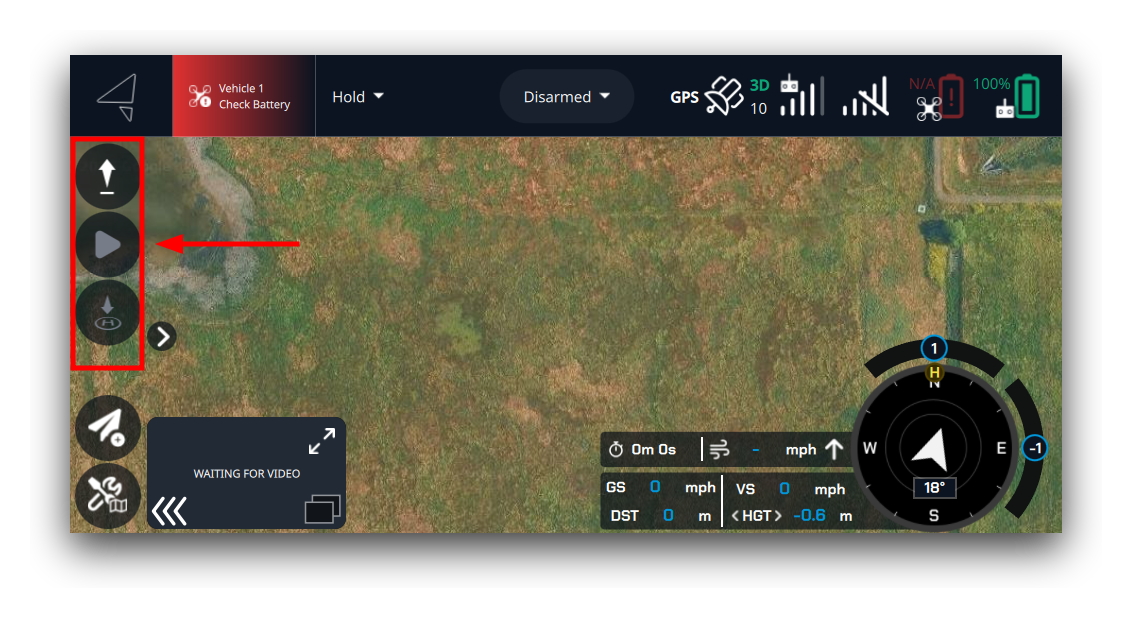
Requirements:
- Filename must contain
flyviewtsbutton(case-insensitive), e.g.,MyPluginFlyViewTSButton.qml. - The root item is sized to
ScreenTools.defaultButtonSize × ScreenTools.defaultButtonSizeby the host — do not setwidthorheighton the root. - Declare
property string name: qsTr("My Button")on the root item to provide a label. When present and non-empty, the label renders to the right of the button — but only while the user has label visibility toggled on via the tool strip's expand button. If the property is absent or empty, no label is shown regardless of toggle state. Always wrap the value inqsTr().
Button appearance — strongly recommended pattern:
Always set these four properties exactly as shown to match the built-in tool strip buttons:
QGCHoverButton {
    flat:                       false
    radius:                     height / 2
    backgroundColor:            qgcPal.windowShadeDark
    disabledBackgroundColor:    qgcPal.windowShadeDark
    ...
}
Example:
import QtQuick
import QtQuick.Controls
import QGroundControl.Controls
import QGroundControl.Palette
import QGroundControl.ScreenTools

// Filename contains "flyviewtsbutton" — AMC loads this as a FlyViewTSButton hook.
// The host sets width and height to ScreenTools.defaultButtonSize.
QGCHoverButton {
    flat:                       false
    radius:                     height / 2
    backgroundColor:            qgcPal.windowShadeDark
    disabledBackgroundColor:    qgcPal.windowShadeDark
    imageSource:                Qt.resolvedUrl("../img/my-icon.svg")
    property string name:       qsTr("My Button")  // optional label beside the button

    onClicked: myPopup.open()

    MyPopup { id: myPopup }
}
Key points:
QGCHoverButtonwithradius: height / 2produces the circular style that matches the existing tool strip buttons.- Place all custom UI — popups, drawers, panels — as child items or separate QML files. The host does not restrict child geometry.
- If no
flyviewtsbuttonplugins are loaded, no extra space is added to the strip. - See the FlyViewTool example for a complete minimal plugin.
MapItemView
The MapItemView hook draws custom items on AMC's maps. A matching file is loaded into both the Plan view map and the Fly view map.
Requires AMC 2.1.0+
This hook was added in AMC 2.1.0. Older versions ignore *MapItemView.qml files — the rest of the plugin still loads normally.
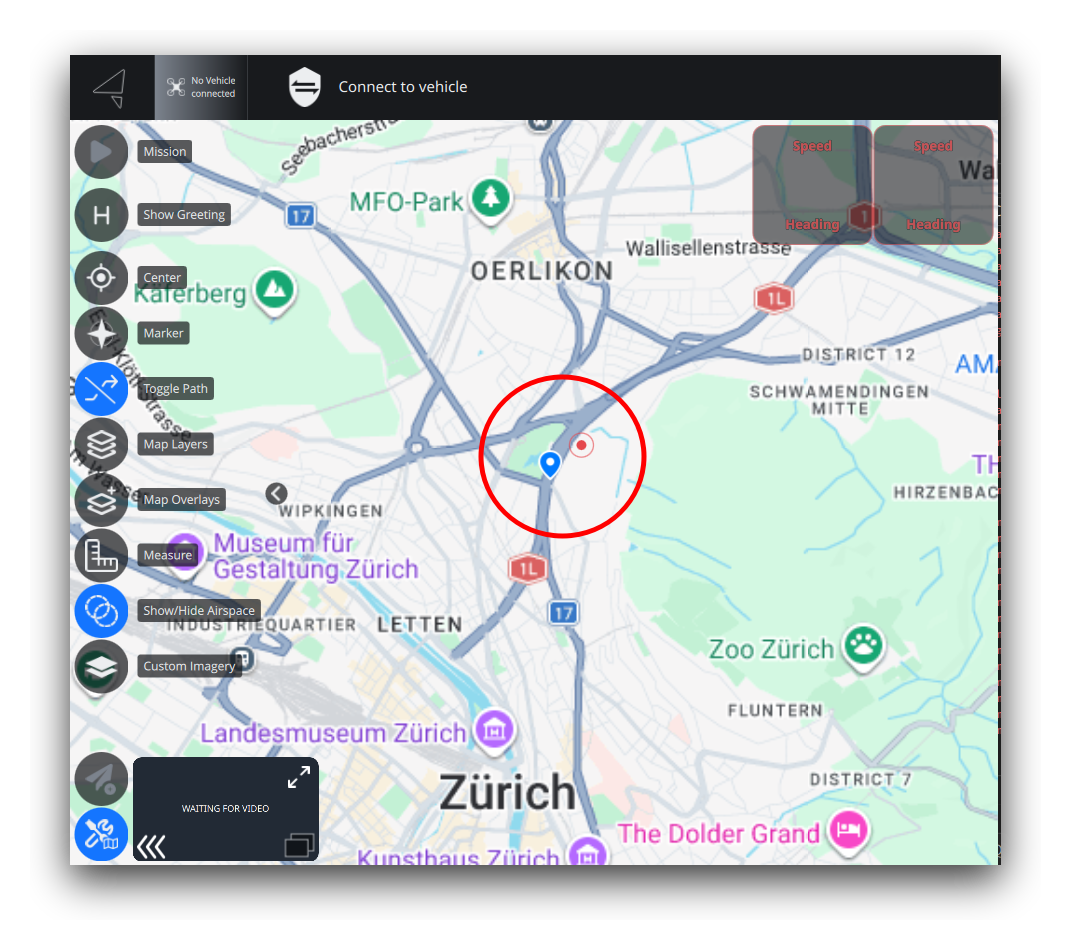
Requirements:
- Filename must contain
mapitemview(case-insensitive), e.g.,MyPluginMapItemView.qml. - The root component must be
PluginMapItemView, fromQGroundControl.PluginInterface. - Never set the
mapproperty — AMC owns it.
PluginMapItemView is a QtLocation MapItemView with the live map already attached. There is no other AMC API surface: you set model and delegate exactly as you would on a standard MapItemView. AMC injects nothing else, defines no roles, ships no default delegate, and requires no particular model name — the model shape, role names, delegate content, and z ordering are entirely your choice.
The only AMC-imposed contract
Filename keyword + root component PluginMapItemView + never set map. Everything else is plain QtLocation — see the linked Qt docs below rather than expecting AMC-specific behaviour.
Example:
import QtQuick
import QtLocation
import QtPositioning
import QGroundControl.PluginInterface   // PluginMapItemView (a MapItemView with map preset)

// Filename contains "mapitemview" — AMC loads this onto both maps.
// Do NOT set `map`; AMC injects it.
PluginMapItemView {
    model: ListModel { id: markers }

    delegate: MapQuickItem {
        coordinate:    QtPositioning.coordinate(model.lat, model.lon)
        anchorPoint.x: content.width  / 2
        anchorPoint.y: content.height / 2
        // sourceItem must be a QML item (not an image file) — wrap the icon in an Image.
        sourceItem: Image {
            id:         content
            source:     Qt.resolvedUrl(model.icon)
            sourceSize: Qt.size(32, 32)
        }
    }

    Component.onCompleted: {
        // Use a fixed coordinate, not map.center: each map (Fly/Plan) has its own center
        // and they aren't synced at load, so map.center is not a stable anchor here.
        markers.append({ lat: 47.397, lon: 8.546, icon: "../img/pin.svg" })
    }
}
View targeting (optional):
The view renders on both maps by default. The wrapper exposes two booleans, both defaulting to true, to restrict it to one map:
PluginMapItemView {
    showInPlanView: false   // hide on the Plan view map (Fly view only)
    // showInFlyView: false // hide on the Fly view map (Plan view only)
}
These are load-time constants — read once when the file loads. Do not bind them to runtime-changing state.
Z-order (optional):
z defaults to the generic map-items tier — above vehicles and trajectories, below waypoints, the active vehicle, and widgets. Override z on the root (or per-delegate) to move the whole view, e.g. to sit on top of everything.
Key points:
- The
delegatecan be any map item. The example uses aMapQuickItem(which anchors arbitrary screen content — icons, custom QML — at acoordinate). To draw a geographic shape that scales with zoom, make the delegate's root aMapPolyline,MapPolygon, orMapCircleinstead. See the map items overview. - A
MapQuickItem'ssourceItemmust be a QML item, not an image file — to show an icon, use anImage. (Likewise aLoader'ssourceis a QML component URL, so pointing one at a.svg/.pngis a syntax error.) - The preset
mapis read-only to you — you must never assign to it, but you may read it.map.center(acoordinate) is the current map position. Note the Fly and Plan views each have their own map and are not centered together at load, somap.centeris not a stable anchor inComponent.onCompleted— use a fixed coordinate for static items, or bind tomap.center/map.onCenterChangedto follow the live center. - A
ListModellocks each role's type from the first row that sets it and silently drops later rows that assign a different type to that role. Keep every role one consistent type across allappends (e.g. always passiconas a string, and resolve it withQt.resolvedUrl(...)in the delegate). - It is runtime-dynamic: mutate the
ListModel(append/remove/set rows) and the map items update live. - Multiple plugins coexist. Each
*MapItemView.qmlis attached as an independentMapItemView— AMC never merges models. There is no upper bound. - See the MapMarkers example for a complete minimal plugin.