MapMarkers Plugin
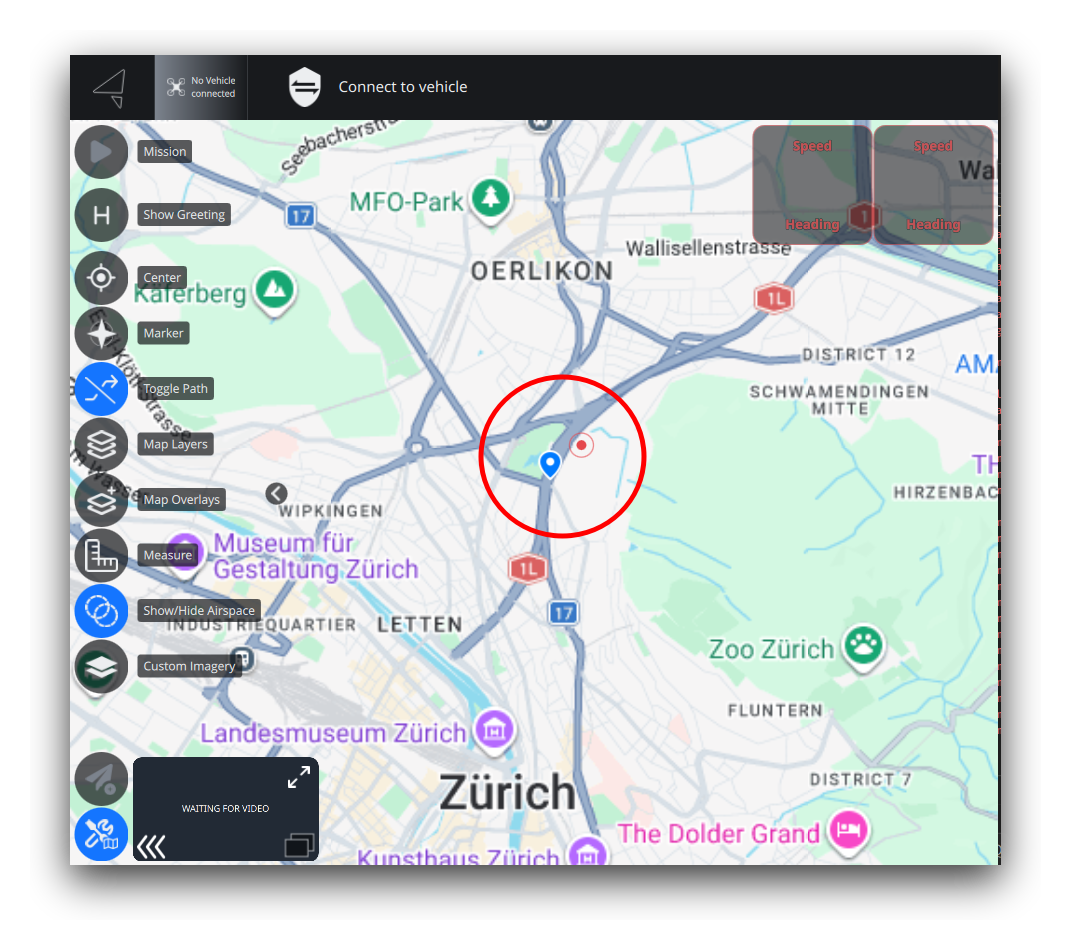
MapMarkers is a minimal plugin that demonstrates the mapitemview hook. It draws two custom markers — a static pin icon and an animated "pulse" component — onto AMC's maps. The same file is loaded into both the Plan view map and the Fly view map. There is no data singleton, no settings panel, and no menu integration — just the map items.
Requires AMC 2.1.0+
The mapitemview hook was added in AMC 2.1.0. Earlier versions ignore the file and nothing is drawn.
Where to look
The markers are placed at a fixed coordinate (Zurich, 47.397, 8.546) so they appear at the same spot on both the Fly and Plan view maps — pan or zoom either map there to see them. The two maps are not centered together at load, which is why the example uses a fixed coordinate rather than map.center.
What it does
- Adds two markers to both maps, driven by a single
ListModel, at a fixed demo coordinate (Zurich) so they appear at the same spot on both maps:- an SVG pin icon, and
- an animated pulsing circle (a sibling QML component) just beside it.
- Renders on both maps by default (no view-targeting overrides).
- Uses one
delegatefor both markers — each row'stypeselects which visual shows.
File structure
MapMarkers/
├── plugin.json
├── build.sh
├── src/
│   ├── MapMarkersMapItemView.qml   ← mapitemview hook
│   └── PulseCircle.qml             ← animated component rendered as sourceItem
└── img/
    └── pin.svg                     ← marker icon
plugin.json
{
    "name": "MapMarkers",
    "description": "Minimal example of the mapitemview hook — draws custom markers on the Plan and Fly view maps",
    "author": "Auterion",
    "copyright": "(c) 2026 Auterion AG",
    "license": "MIT",
    "type": "qml"
}
MapMarkersMapItemView.qml
AMC detects the mapitemview keyword in the filename and attaches the file to both maps.
Key patterns demonstrated:
- root component
PluginMapItemView(fromQGroundControl.PluginInterface) — a QtLocationMapItemViewwith the livemapalready attached, so the file never setsmap - an inline
ListModelwith author-defined roles (lat,lon,type,icon) - a single
delegate— aMapQuickItemanchored at acoordinate, whosesourceItemholds both visuals and shows one based on the row'stype - an icon row (an
Imageshowingpin.svg) and an animated row (PulseCircle.qml) sharing the same model and delegate — note asourceItemmust be a QML item, so the icon is anImage, not a raw.svg - a fixed demo coordinate rather than
map.center: the Fly and Plan maps aren't centered together at load, somap.centerisn't a stable anchor inComponent.onCompleted(it's still readable — bind to it ormap.onCenterChangedto follow the live center) - one consistent type per
ListModelrole (iconis always a string), resolved withQt.resolvedUrl(...)in the delegate — aListModellocks each role's type from the first row and drops later rows of a different type
See the full source: MapMarkersMapItemView.qml.
import QtQuick
import QtLocation
import QtPositioning
import QGroundControl.PluginInterface   // PluginMapItemView — a MapItemView with `map` preset

PluginMapItemView {
    // Do NOT set `map`; AMC injects it. Renders on both maps by default; set
    // showInFlyView / showInPlanView to false to restrict to one (load-time constants).
    model: ListModel { id: markers }

    delegate: MapQuickItem {
        coordinate:    QtPositioning.coordinate(model.lat, model.lon)
        anchorPoint.x: content.width  / 2   // center the content on the coordinate
        anchorPoint.y: content.height / 2

        // sourceItem must be a QML item — hold both visuals, show one by model.type.
        sourceItem: Item {
            id:     content
            width:  Math.max(icon.width,  pulse.width)
            height: Math.max(icon.height, pulse.height)

            Image {
                id: icon
                visible:    model.type === "icon"
                width:  32; height: 32
                source:     model.icon ? Qt.resolvedUrl(model.icon) : ""
                sourceSize: Qt.size(width, height)
                fillMode:   Image.PreserveAspectFit
            }
            PulseCircle { id: pulse; visible: model.type === "pulse" }
        }
    }

    Component.onCompleted: {
        // Fixed demo coordinate so both markers land at the same spot on both maps
        // (map.center isn't synced across the Fly/Plan maps at load). `icon` is a string
        // in both rows — a ListModel locks each role's type from the first row.
        const lat = 47.397, lon = 8.546   // Zurich
        markers.append({ lat: lat,          lon: lon,          type: "icon",  icon: "../img/pin.svg" })
        markers.append({ lat: lat + 0.0015, lon: lon + 0.0025, type: "pulse", icon: "" })
    }
}
PulseCircle.qml
The animated marker, kept in its own file and pointed at by the second model row.
It is screen content, not a map item
Because PulseCircle.qml is loaded as the sourceItem of a MapQuickItem, it is screen content anchored at a coordinate, not a geographic map item. It must therefore be a plain Item/Rectangle. Do not make it a MapCircle/MapPolyline/MapPolygon — those are map items and will not render inside a sourceItem. To draw a true geographic shape, make the delegate's root that map item type directly instead of wrapping it in a MapQuickItem.
See the full source: PulseCircle.qml.
import QtQuick

Item {
    width:  40
    height: 40

    Rectangle {
        anchors.centerIn: parent
        width:        parent.width
        height:       parent.height
        radius:       width / 2
        color:        "transparent"
        border.color: qgcPal.colorRed   // qgcPal is globally available — no import needed
        border.width: 2

        SequentialAnimation on scale {
            loops: Animation.Infinite; running: true
            NumberAnimation { from: 0.4; to: 1.0; duration: 1000; easing.type: Easing.OutQuad }
            NumberAnimation { from: 1.0; to: 0.4; duration: 0 }
        }
        // ... matching opacity animation ...
    }

    Rectangle {
        anchors.centerIn: parent
        width: 10; height: 10; radius: width / 2
        color: qgcPal.colorRed
    }
}
Building and installing
This produces MapMarkers.plugin. Copy it to the AMC Plugins folder:
AMC loads plugins at startup and watches the folder for changes — no restart needed when adding or removing a plugin file.
Next steps
- Drive the model from a Data singleton — append or remove markers at runtime in response to telemetry.
- Restrict the view to one map with
showInFlyView/showInPlanView. - See the MapItemView hook reference for the full contract, and the linked Qt docs for QtLocation map items.